Calculated Variables
Calculated Variables allow you to perform logic or mathematical operations on form responses. Powered by HyperFormula, the industry-standard spreadsheet logic engine.
Creating a Variable
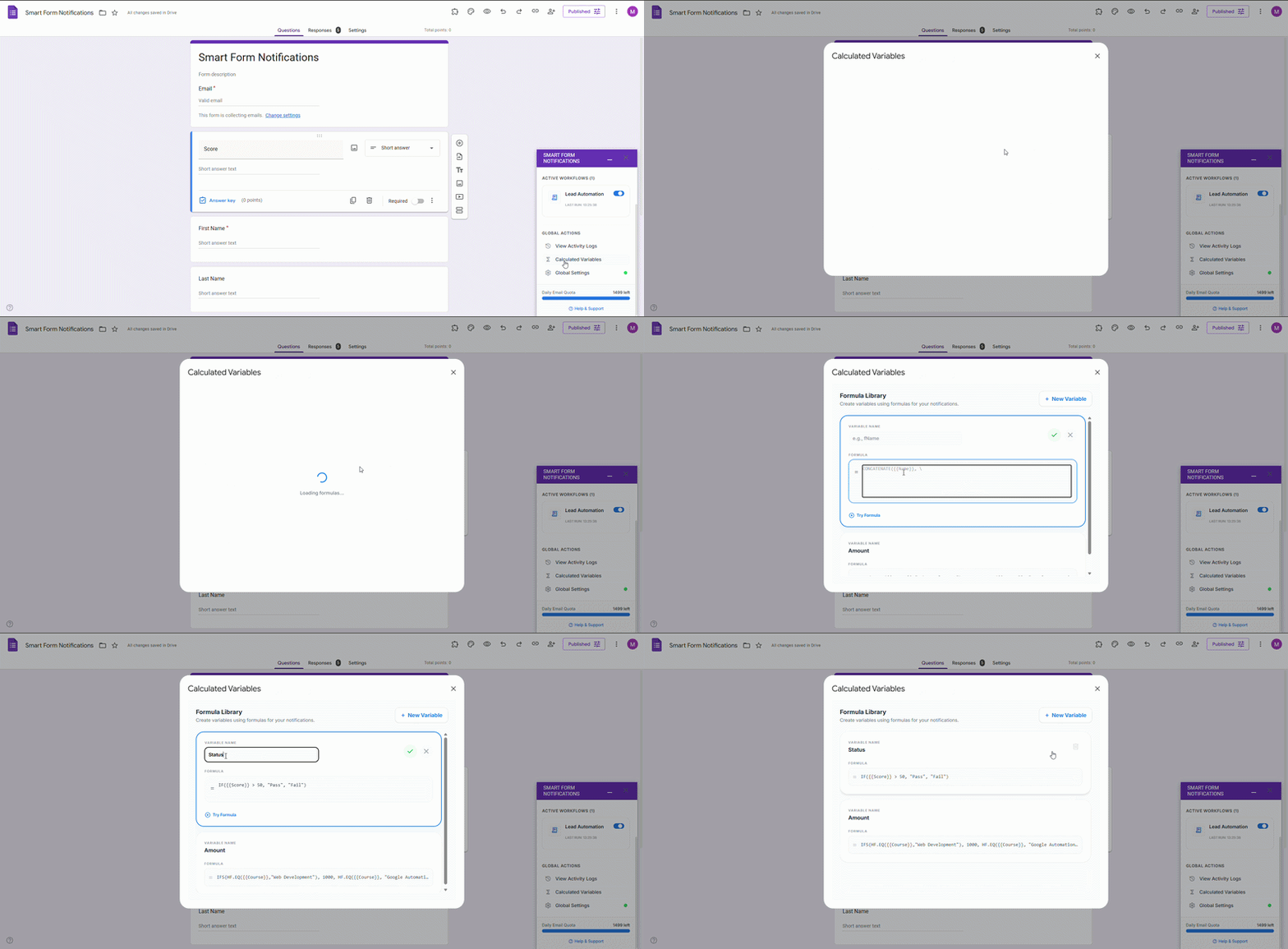
Access from Sidebar
Click the Calculated Variables button in the main sidebar. This tool is available globally for your form.
Input Formula
Use HyperFormula syntax to define logic. Example: =IF({{Score}} > 50, "Pass", "Fail")
Name Your Variable
Give it a handle like {{Status}} for reference in your email templates.
Save & Use
Once saved, this variable appears in the 'Insert Variables' panel in your Email Template editor.
Visual Guide: Creating Formulas
Watch how easily you can define logic within the add-on sidebar.
HyperFormula Reference
Smart Form Notifications supports a wide range of spreadsheet-style functions for advanced data manipulation.
Logical
| Function ID | Description | Syntax |
|---|---|---|
| AND | Returns TRUE if all arguments are TRUE. | AND(Logical_value1, Logical_value2, ...) |
| IF | Specifies a logical test to be performed. | IF(Test, Then_value, Otherwise_value) |
| IFS | Evaluates multiple logical tests and returns a value. | IFS(Condition1, Value1, [Condition2, Value2, ...]) |
| NOT | Complements (inverts) a logical value. | NOT(Logical_value) |
| OR | Returns TRUE if any argument is TRUE. | OR(Logical_value1, Logical_value2, ...) |
| SWITCH | Evaluates an expression against a list of values. | SWITCH(Expression, Value1, Result1, ...) |
Math & Trig
| Function ID | Description | Syntax |
|---|---|---|
| SUM | Adds its arguments. | SUM(Value1, [Value2, ...]) |
| ROUND | Rounds a number to a specified number of digits. | ROUND(Number, Digits) |
| ABS | Returns the absolute value of a number. | ABS(Number) |
| MOD | Returns the remainder from division. | MOD(Number, Divisor) |
| POWER | Returns the result of a number raised to a power. | POWER(Base, Exponent) |
Text
| Function ID | Description | Syntax |
|---|---|---|
| CONCAT | Concatenates two or more strings. | CONCAT(Text1, [Text2, ...]) |
| LEFT | Returns characters from the start of a string. | LEFT(Text, [Num_chars]) |
| RIGHT | Returns characters from the end of a string. | RIGHT(Text, [Num_chars]) |
| MID | Returns characters from the middle of a string. | MID(Text, Start_num, Num_chars) |
| LEN | Returns the number of characters in a string. | LEN(Text) |
| LOWER | Converts text to lowercase. | LOWER(Text) |
| UPPER | Converts text to uppercase. | UPPER(Text) |
| TRIM | Removes leading and trailing spaces. | TRIM(Text) |
Date & Time
| Function ID | Description | Syntax |
|---|---|---|
| TODAY | Returns the current date. | TODAY() |
| NOW | Returns the current date and time. | NOW() |
| DATE | Returns a specific date. | DATE(Year, Month, Day) |
| YEAR | Returns the year of a date. | YEAR(Date) |
| MONTH | Returns the month of a date. | MONTH(Date) |
| DAY | Returns the day of the month. | DAY(Date) |
Lookup & Aggregation
| Function ID | Description | Syntax |
|---|---|---|
| VLOOKUP | Looks for a value in the first column of a range. | VLOOKUP(Search_key, Range, Index, [Is_sorted]) |
| MATCH | Returns the relative position of an item. | MATCH(Search_key, Range, [Search_type]) |
| INDEX | Returns a cell from a range. | INDEX(Range, [Row], [Column]) |
| SUMIF | Adds cells specified by a criteria. | SUMIF(Range, Criterion, [Sum_range]) |
| COUNTIF | Counts cells that meet a criteria. | COUNTIF(Range, Criterion) |
Information
| Function ID | Description | Syntax |
|---|---|---|
| ISNUMBER | Returns TRUE if value is a number. | ISNUMBER(Value) |
| ISTEXT | Returns TRUE if value is text. | ISTEXT(Value) |
| ISBLANK | Returns TRUE if value is empty. | ISBLANK(Value) |
Pro Tip: Testing Formulas
When referencing form fields, ensure your merge tags match your question labels exactly. Variables are case-sensitive and should be wrapped in brackets, like {{Total_Cost}}.